VMWare Network on Mac OS X x86

How to make your Mac OS X x86 network works with VMWare Workstation???

After Mac OS X has been installed on VMWare Workstation, you will found that the network is not working or the network card it’s not recognize by Mac OS X. You can get the network driver here and follow the instruction below.

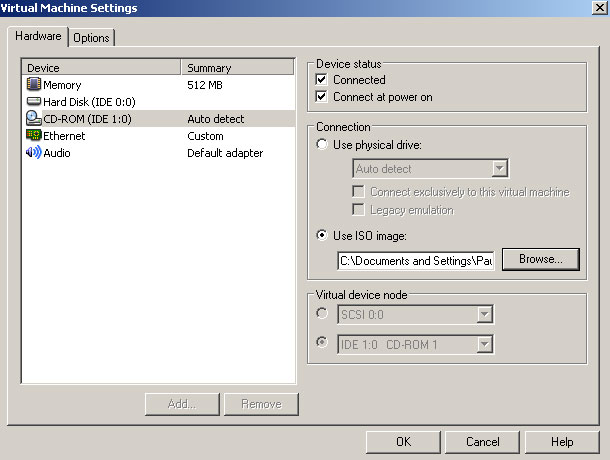
Select the ISO file you have downloaded as your CDROM drive
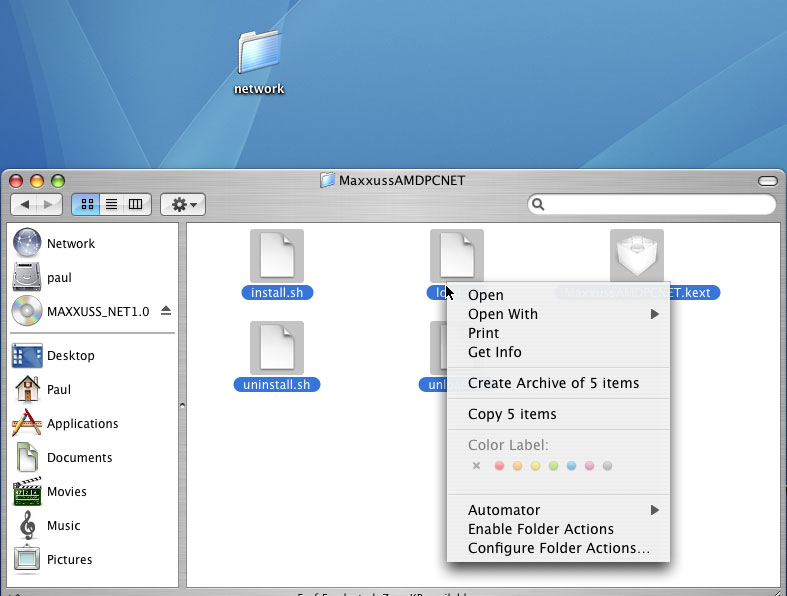
Create a new folder on Desktop(for example network), copy the files from the “CDROM” into the new folder.
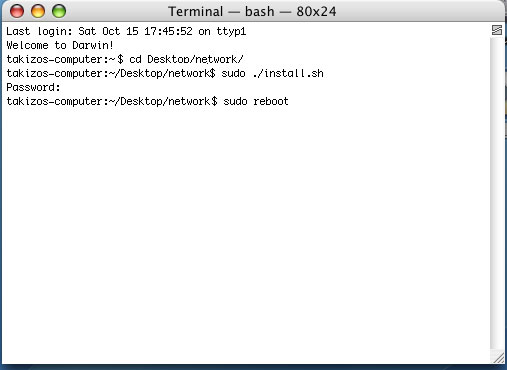
Open up the terminal, navigate the to driver folder, run install.sh file and reboot
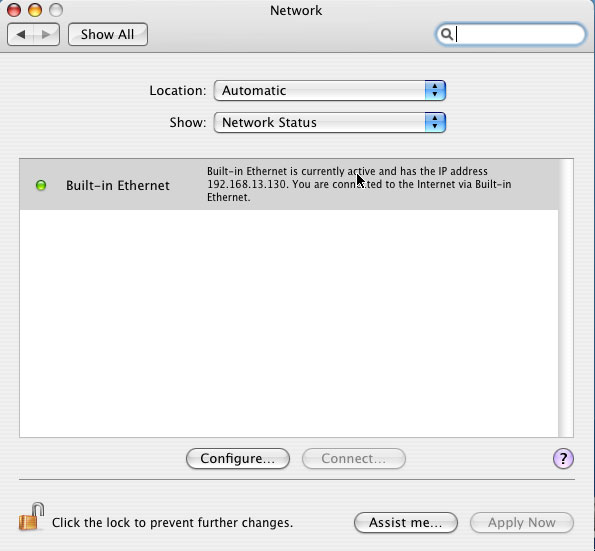
After reboot, I _think_ your network is working now.(bridge,nat or host also work). Hope it helps. For more information and support please visit the driver’s website
  • Share/Bookmark

No related posts.

152 Responses to “VMWare Network on Mac OS X x86”

  1. Ben Says:

    after i reboot…it says…”the cable for Built-in Ethernet is not plugged in.”with a red light…instead of “Built-in Ethernet is currently……..”
    why’s that?

  2. PauL Says:

    Are you installing on VMWare?

  3. PauL Says:

    Hey guys, I would appreciate if you guys can leave some comment for success installation. Thank.

  4. pRahEc Says:

    Installed succesfully ;-) Works with bridged network interface (NAT). VmWare version: 5.5 beta. Thanks for the info.

  5. PauL Says:

    thank mate for informing :)

  6. Owen Rudge Says:

    Works nicely here on VMWare 5.5. :)

  7. PauL Says:

    hey great man..

  8. pat Says:

    thx very much ;) worked immediatley after reboot with DHCP

  9. chris Says:

    hi,

    got vmware 5 and it doen’t work
    do i need to update my vmware?

    thx chris

  10. Perlan Says:

    Thanks!!!

    Now working perfect on VMware 5.5

  11. Paul Ooi Says:

    Great! :D

  12. thecarpy Says:

    it worked fine, thanks ….
    I just installed the driver on opendarwin … I will get an intel mac and enjoy mac os x the ‘legal’ way …. ;-)

  13. jello Says:

    i installed natively and i cant get this driver to work. The audio drive from the same source worked fine.

  14. FuLLY Says:

    Works great, thanks, but audio link is down :-/
    Any other place to get it?
    How to change locale and keybord, please.

  15. Bitchslap Says:

    I am running the deadmoo image under VMW 5.5 and cant seem to get the networking working. Any ideas what the password is when prompted?

    Thx in adv!

  16. Bitchslap Says:

    Tis OK…..pword is apparently bovinity

    Thank you google!

  17. 琮正 Says:

    congrat mate!

  18. urcindalo Says:

    I just installed the OS X 10.4.3 8F1111g DVD you can find as a torrent.
    The installation in VMware Workstation 5.5.1.19175 (Gentoo Linux 64 bit as host) went fine, but the first reboot after installation showed a message telling me Maxxus’ network card wasn’t installed properly.

    So, I just installed it manually from the ISO installer provided in this very same page. This time I saw no warning message whatsoever after a reboot. However, I still get no connection. “Built-in Ethernet” is visible but grayed-out in the Network control panel.

    Does anybody have any clue? As a regular OS X user at home (PPC), I’d like to be able to use it under Linux through vmware, since this way I could use 3 OS’s simultaneously at work, and relief myself from carrying my PowerBook.

    Thanks in advance.

  19. WhoAreYou Says:

    I just installed on VMWare 5.5 and after rebooting the computer detected a new serial port. built in ethernet port is grayed out. I am using the deadmoo image.

  20. Don'tKnow Says:

    WhoAreYou

    Did you remember to Add an Ethernet device in the virtual machine settings?

  21. Kevin Says:

    Thanks! Works great with NAT in VMware! Awesome stuff.

  22. Erwin (the Netherlands) Says:

    I was trying hard to make this work, but thanks of your information its now working.
    Now i’m gonna try to get the sound working as well.
    I got the same problem as the guy above the: Deadmoo/bovinity thing…
    I never heard of the sudo command so i did forget it the first time….
    Its not working very fast, because i need some extra memory…

  23. Jeroun Says:

    Thanx, worked fine after a reboot.
    OS-X is up and running on VMware Workstation 5.0.0 build 13124 now.

    :-D

    Jeroun

  24. Sirius Black Says:

    Thanks, it works! :)

  25. aBud Says:

    Hi,

    What are the hardware requirement for this to work. Since the OS should see the emulated VMWARE network card, how come the installation state that it works on AMDNET ?

  26. Duce Biggalow Says:

    Hey, this worked a great, green light all the way,

    I have seen many questions asking what “deadmoo” s administrator password is, it is “bovinity”………. enjoy !

  27. Fred Says:

    FANTASTIC!!!!!!!!!!!!!!
    Work great! Thanks!!! :D

    Fred ^_^

  28. nix Says:

    if you are using premade image from Bittorrent tiger-x86-flat.img (tiger-x86.tar.bz2) with administrator pass bovinity and you are using
    Vmware player instead of workstation, just put ethernet0.present = “TRUE” in your tiger-x86.vmx instead of ethernet0.present = “FALSE”.

    Then do all the steps are in this article and reboot. It’ll work.

    Great fun :)

  29. carlos Says:

    Works a treat. Thanks!

  30. Jordan Adler Says:

    I’m wondering if you guys could help. I d/l the tiger-x86.tar.bz2 and tried starting it up using VMware player and it looks like it is going into OS X but then OS X tells me that I need to restart my computer. I restart the player but it still gives this message. Any way around this?

    Thanks!

  31. Phil Smith Says:

    Followed the instructions, works like a charm.

    VMWare Workstation
    5.5.1

  32. Another Phil Says:

    Another thumbs up – it didn’t work at first but then I did the add ethernet adapter thing in VMWare, and it worked on a reboot.

  33. vmware noob Says:

    I got the networking working with your tips, but I experience almost unbearable browser crashing (safari) using the deadmoo image. Do you have any tips for fixing that issue?

    installed Ie5 and firefox and neither of those two apps will even run.

    (vmware 5.5)

    thanks,
    AJ

  34. Cyril Says:

    to [Jordan Adler]:
    i think you should type in “-v” during start-up, see if that helps

    to nix:
    where is this tiger-x86.vmx file? i want to config it!

    to everyone:
    ive got past thru all steps except i am still getting red light saying “The cable for ethernet is not plugged in”, im sure ive sticked rj45’s both ends right . also i have added a new network port called “ethernet” and config’ed it to DHCP (tried DHCP manual too), i guess my luck ends here

    ps: my built-in ethernet is gray’ed out and im on the tiger-x86.tar.bz2

  35. Cyril Says:

    sorry ive found out where the tiger-x86.vmx is, it was right next to the tiger-x86 image file. even with the line TRUE/FALSE modified it still didn’t work after re-dd’ed under linux

    so far ive tried everything including adding a new network port with the default active “PCI FireWire Slot PCI”, tho it was really not much of chance since the “Built-in Ethernet” was grayed out.

    is there any other way we can get the network to work, or to active the “Built-in Ethernet”?

    ps: when i installed the Maxxus’ network patch either with “./load.sh” or “./install.sh” it returned ” kextload: MaxxusAMDPCNET.kext loaded successfully”, still uncertain what were there left to do

  36. todd Says:

    Working great with Bridged ethernet on VMware 5.0. Thanks!

  37. Koas Says:

    Great info!! Works great in VMWare 5.0 Windows XP!! Thanks pal!!

  38. Rafael Says:

    Great, it works fine.

  39. bryan Says:

    looks like it works!

  40. Rob Says:

    VMWare Server 1.0.0 build-28343 running under Ubuntu Linux 6.06

    Booted fine. Network mod worked great. Safari hangs on launch though… :-/

  41. Dave Says:

    I’ve managed to get the ethernet installed, by my host PC is connected through a Microsoft ISA server which requires authentication. I’ve tried setting up the socks proxy in the system configuration to point to the proxy server, and entered my username and password but no joy – any ideas?

  42. pinokio Says:

    thx thx thx working very good on REALTEC8139 NIC

  43. Greg Says:

    worked like a charm on latest vmware server using bridged… thanks!!

  44. NoSpamPlease Says:

    Hi! With OSX 10.4.6 Maxxuss driver fails to load. It refers to IONetworksomething class that it is as the superclass of the Maxxuss driver is a wrong version. Does anyone have any url where can be downloaded the Maxxuss rebuilded driver for 10.4.6, or another solution for this problem? thanx.

  45. slotboxed Says:

    The 10.4.3 driver in the rapidshare link in this google cache page works fine on 10.4.7. The driver that was automatically installed during initial install of 10.4.7 did not work. I deleted it and installed the above driver, rebooted (and saw it loading during the bsd part of the boot) and it worked.

  46. hercho Says:

    Works !! you are a master! :)

  47. zbd Says:

    Thanks so much! The specified driver works well, and the network under VMWare works!
    Thanks for help!!!

  48. rad Says:

    My mac osx vmware works fine (I suppress the AppleTPMACPI.kext file). But, as “vmware noob”, IE or Fireffox crash when I launch them and Safari often crash. Any tips ?
    thx

  49. elie Says:

    hi,
    I have the same problem as Jordan, when I start tiger in VMware, darwin loads and then tells me that I need to restart.. I restart the machine and I did not work, I restarted the player and it did not work either.,
    -v did not work, -x did not work …

    HEEEEEEELLLLLLLLLLPPPPPPPPPPPPPP PLEASEEEEEEEEEeee

  50. Marius Says:

    Thanx man very much. Works fine on VmWare Workstation 5.5.2 running under Windows XP Pro SP2. Works internet on my Mac, great work man :)

  51. Irsan Tedja Says:

    I found that I didn’t have to do the install above. All I did was:

    1) Set Mac OS X to pick up the IP settings from the DHCP server.

    2) Shut down Mac OS X VM.

    3) In VMware for WS, go to “Edit virtual machine settings”, and select “Ethernet” from the Hardware/Device list.

    4) Select “NAT” instead of “Bridged” on the Network Connection List on the right.

    5) Restart your Mac OS X Machine. You should now be able to connect to the Internet (although your IP address will be in a different range to your host machine, your Mac OSX VM would basically be on a separate subnet to your host machine).

  52. nuvul Says:

    Fantastic man…

  53. Eli Says:

    Works Great! thanks a lot for the driver, you made my Mac experience alive.
    now I’ll be a little perky and ask gor Sound Driver. Is it exist?

  54. Embrace Says:

    Hi! i got network card configured but i still can not connect to internet.

    When i installed vmware i set up 10.0.0.1 as ip is it right? connection is enabled…but i can not ping. Thanks

  55. Embrace Says:

    I also made a shot so that you can better understand my situation…

    http://img442.imageshack.us/img442/7691/schermatavt0.png

  56. Dennis Says:

    Works fine here…

    I use VMWare 5.5 and te tiger-x86-flat.img (tiger-x86.tar.bz2)
    I had to change the line ethernet0.present = “TRUE” in tiger-x86.vmx instead of ethernet0.present = “FALSE”.

    After this I run the install.sh with the Terminal and my connection was set up.

  57. Josh Says:

    Can conform that this also works on VMware Workstation 6 Beta, Thanks! Works great.

  58. Alex Says:

    Thanx! this worked great!!!!!!

  59. Alexey Says:

    Can anyone please provide a sound driver for that?

    Thanks in advance

  60. Marcin Says:

    Thanks, I have ethernet now.

    But I also have the same problem as rad and noob – browsers crash.

    any hints?
    M

  61. Serkan Says:

    arkadaşlar driver vmware de düzgün çalışıyor. Thx. it worked fine :P

  62. Jeff Says:

    I need help, I’m not sure what to do. Everytime I am in terminal, I am stuck. I tried dragging the install.sh(From my folder and the Cd-ROM) into the terminal and press enter but it always says that
    MaxxussAMDPCNET.kext not located. Not found. Or something like that. I also notice in the commands of the terminal, they refered to the System/Library/Extension/IOs…..kext/…/…/… something like that.

    Please reply as soon as possible!!

    *BTW – R u Malaysian?*

  63. Jos Says:

    Hey Man, this has been a great help! Now I can use Safari on my notebook to test websites! You’re great…

  64. dzedward Says:

    this is great, high tech stuff right here. the only thing i cant get to work is firefox. it downloaded fine, installed fine, but it wont launch. o well, Vista and OS X all in one, cant get much better!

  65. Osama Says:

    How am I supposed to get the file from my native os to OSX running in VMWare? I can’t download the file directly to OSX because the internet isn’t working yet, so how do I get the driver into OSX?

  66. Osama Says:

    Nevermind, got it. I’m rebooting the VM now to see if the internet will work.

  67. Osama Says:

    Does anyone have sound from OSX running in VMWare? I thought it would make some sounds in the OS, but I hear none.

  68. Pop Says:

    This driver is great. Works on Win XP, VMware WorkStation 5.5.

    I do have one problem though. Safari crashes all the time.
    Any fix for this?
    (I have deleted the AppleTPMACPI.kext file for a speed boost, maybe that is the cause?)

    Thanks.

  69. Martinfe Says:

    Didnt work for me. But I get it work adding a second Network device and editing the VMX file. On “Ethernet1.virtualDev =” I write “e1000″ with “”. I start x86 and put the TCP/ip configuration.
    I was using VMWare Server 1.0.1 ans Jas for AMD 10.4.7

    Thanks,

  70. AAK Says:

    i got this msg “sudo: ./install.sh :command not found”

    any1 can help ?

  71. gs Says:

    Thanks for the instructions, the networking works great. Safari seems to have problems under vmware though. It is crashing while parsing web pages. Does it have to do with the non supported SSE3 instructions on my CPU or it is a vmware issue? I just wonder if installing the OS natively (on the same PC architecture) would solve the problem. Any comments appreciated. Thanks, George.

  72. mofo Says:

    about the slow speed: from Tech|ZONE;

    A problem has been noted that some computers run very sluggishly with Mac. In Mac, go to: System/Library/Extensions and remove AppleTPMACPI.kext and then restart Mac. Mac should now run MUCH faster.

    omfg now with the CPU speed at 5% and internet working im in apple heaven

  73. mofo Says:

    by the way i had to change the option from bridged to NAT in VMware settings

  74. raj Says:

    awesome, everything and the network works perfect!! though running itunes fail and installing applications fail as well.

    thanks a lot guys…u owe a lot!

    best wishes

  75. 矮子 Says:

    wah , damn lot of good respond to this, but i am totally blind to it , what a shame

  76. bwfollis Says:

    I am new to MAC. By the pic Embrace published I can see he has FireFox running! Mine does nothing. Is there a trick? I copied the .dmg file to the applications folder – but it does nothing but bounce the icon when I click it.

  77. Mo Says:

    Thanks to your link to Maxxuss’ driver, I just got Darwin 8.0.1 installed (with networking!) on the final release of VMWare Fusion—many thanks!

  78. FF Says:

    i got this msg “sudo: ./install.sh :command not found

    just copy everything after the $
    (and not everything before the $)
    and hit enter

    $ cd desktop/network/
    $ sudo ./install.sh
    $ sudo reboot

    FF

  79. FF Says:

    when asked for password type
    bovinity
    and wait for response
    after response and if you did all correctly
    at the command
    sudo reboot
    Virtual Mac will reboot

  80. sdr Says:

    works on vista with vmware 6.0

  81. John Says:

    worked great thanks!

  82. JamesB Says:

    Working here on VMware 6 & Tiger x86.

    J

  83. Raboof Says:

    For those trying to run tiger-x86 in VMWare (I use version 6):

    Instead of deleting AppleTPMACPI.kext, you can also use a startup option in the boot loader. When you start the virtual machine, press the SPACE bar (when prompted) to input boot options. Then type:

    platform=X86PC

    then hit ENTER to continue booting. Your system will work just as fast as if you deleted the AppleTPMACPI.kext file. I’m not sure if it is the same as deleting the file or not, but my system works fine. At the very least, this should help you get into the system quicker to delete AppleTPMACPI.kext!

    good luck.

  84. ArtCube Says:

    password for the osx.rar vmare image os OS X 10.4.7 is not bovinity

    does anyone now what it is? Seems to be running as user Tom on toms-computer

    Thanks

  85. randolf Says:

    Got the network to work! And also “platform=X86PC” works also. It speeds things up very well and fixed my hanging at the boot screen problem. I’ve tested both of these on vmware workstation 6.

  86. None Says:

    Note that 10.4.7 and above require http://video.paulooi.com/Maxxuss-AMDPCNET-v1.0_1043.zip !!! That works like a charm.
    The zip linked above will yield the error message “23maxxuss_driver_AMDPCNET is not compatible with its superclass, 20IOEthernetController” if loaded directly.

  87. Obiwan Says:

    I could have install the driver but the system is so slow now. I have a AMD 3600+ and i asingned 512mb RAm to the vm

  88. Luca Says:

    Thank you a looooooooooooooooot!!!!Now,internet works on my Hackintosh(erm,OS X86 on VMware Server).But I’ve a problem with sound(doesn’t work).Can you send me the driver at luca_thegamemaker@hotmail.it?Thanks.

  89. Marco Says:

    GREAT:: late hacknight without ucces on networking.. glad i ran into the driver at http://video.paulooi.com/Maxxuss-AMDPCNET-v1.0_1043.zip !!! Worked right away now, thought i went nuts last night :) On ACER M5500 Q6600 VMware6 all fine now!

  90. unknown Says:

    thanks, it just all f***** up os x. I get a “You need to restart your computer” message every time i try to log on. Because of your f****** driver i got to reinstall os x.

  91. ledper Says:

    Thank so much for the info about the new driver … i was install and my tiger work in my vmware server …

    Thanks very much Really

  92. Irishtr Says:

    Im running latest version of VMWare 6.0 (recent build as of 11/3/07) Installed OS X x86 10.4.8 JAS2 with Intel Patch. I have a Core 2 Duo 2.4Ghz 2GB Ram, I assigned 1GB RAM and setup the e1000 in the vmx like the posts said. I even used the MaxxussAMDPCNET files accordingly and still no joy :(

    The closest I get is the network adapter gets an IP and I can ping the Guest OS IP in OSX as well as Ping the Host (XP SP2) IP. But I cannot ping my gateway/router or anything beyond that. I really would like to get this running because it will be a great tool for testing various things that I need to do.

  93. DaMista Says:

    It’s a no go here :(

    Not sure where exactly the problem is. I’m running VMware server 1.04 on a CentOS 5 64Bit machine. OS X (JaS 10.4.8) installs fine but I can’t get networking to go. Starting OS X, there’s no network interface shown in “network status”, the Adapter “Built in Ethernet” is available though (shows in “network port configurations”. When I disconnect the Interface from VMware, the Built-in-Ethernet adapter instantly shows up in the “Network Status” box, first with a red light and then orange, telling me it has a self assigned IP address. When I reactivate the Interface, nothing changes. The interface still has its 169….IP address and nothing works. Dunnily enough, I noticed that the MAC address of the interface is “00:00:00:00:00:00″ and not the MAC address given in the config file of the VM. I guess that’s the problem but how do I convince OS X to use the proper MAC address?

  94. Gurney Says:

    It worked fine. I have net acces now, but why can’t I install any packages from the net? Even Fink say This program is for i386 not x86, bailing out. What’s that about?

  95. JR Says:

    GREAT! Works like a charm. (Workstation 6 / Tiger 10.4.1)
    Next problem: No sound. I notice a lot of people have the same problem. Any solution available?
    Thanks a lot.

  96. Christina Says:

    I’m not able to get it to work for some reason. I rebooted after following the instructions on workstation 6 and it still refuses to connect.

  97. Olli Says:

    Hallo Christina.
    More or less the same to me. The only thing i get is either ” no such file or directory”or, “command not found”. This becomes really frustrating!

  98. Olli Says:

    It works. But you have to put the items into the networkfolder without that MaxxussAMDPCNET folder. Otherwise the direction will not work in the terminal. Sounds really stupid, but if one isn’t used to terminal work it could last a long time until you get it. Thanks

  99. thabc Says:

    it work in VMware Workstation ACE Edition. I just add a new network card and install Maxxuss-AMDPCNET-v1.0_1043.zip. os will indicate a new network card for use and u can set what u want.

  100. tRIzzO Says:

    Hi! Using VMWare 5.5 and Mas OSX Darwin 10.4.1 (x86) finally my network is working properly… thx.

  101. Trevor Says:

    I have the same issue as DaMista. I get an ip address but i am unable to ping anything or resolve DNS. The Mac address that the OS shows is 00:00:00:00:00:00. I loaded the drivers per the instructions above and peformed the “e1000″ fix mentioned above. Still no luck. I am running Vmware Workstation 6.0.1 with OSx 10.4.8. Any ideas?

  102. misha Says:

    Does afp work with this virtual setup?
    Thanks!

  103. redM Says:

    Hi Paul

    it wordek perfectly.
    Thank you for that description!

    Salut
    redM

  104. Drrrica Says:

    Doesn’t work for tiger 10.47 or it might be it hanging. Update please?

  105. Luis Costa Says:

    Hello
    I have Dual Quad with Realtek RTL8168/8111 network.
    I cannot install the network driver it is always giving me this error” 20maxxuss_driver_AMDPCNET is not compatible with its superclass, 20I0EthernetController superclass changed?
    Kextload: a link/load error occured for kernel extension MaxxussAMDPCNET.kext load failed for extension MaxxussAMDPCNET.kext”
    I Have Vmware version 6.0.2 build-59824 with windows xp SP2 with all updates.
    thx.

  106. Bergomi Says:

    Hello

    now, network and internet access works fine.
    - after installation of MaxxussAMDPCNET driver (v1.0_1043) shutdown VM
    - in vmx-file delete the line ethernet0.virtualDev=”e1000″
    - start VM
    - Mac OS find new network card (PCI Ethernet Slot)
    - shutdown VM
    - re-config Ethernetcard to NAT (with DHCP) in VMWare
    - start VM
    That’s it!

    VMWare 6.0.2-59824, Windows XP SP2

  107. george Says:

    What is the password ???????????

  108. Jan Says:

    I managed to get a working OS X in VMWare with working sound and network. I used the following:
    -VMWare Workstation 5.5.3
    -Mac OS X 10.4.8 [JaS AMD-Intel-SSE2-SSE3 with PPF1 & PPF2].iso
    -Maxxuss-AMDPCNET-v1.0_1043.iso

    I have used 2 ethernet devices in VMWare, one NAT and one bridged. I could use Safari to get on the internet. Both nic’s where DHCP client.

  109. Sean Says:

    well just like everybody did , follow the steps and it works like a charms , right now visitingthe apple website although its a bit slow but iys running until then i have think about my memory upgrade , i fell in love with MAC OSX :-s
    COOOOOOOOOOOOOOOOOOOOOOOOOOOOOOOOOOOL
    Config :
    VMware 6.0.2 ACE Edition
    758 Ram
    2.8 CPU
    64 M Graphic Card

    Oh Thx alot :p

  110. jb Says:

    Cheers mate, brilliant!

  111. mojo Says:

    Worked perfectly

  112. ili Says:

    there is no connection on my network list

  113. joe Says:

    I’ve just installed VMware on an imac but I’m unable to access the shared drives on the windows workgroup. Can anybody help?

  114. kpax Says:

    Just wonderfull

  115. gotcha Says:

    I could not get built-in-ethernet in the network section.
    Any suggestions?

  116. Tom Says:

    Worked great – using NAT

  117. etherscape Says:

    Success!!!

    Setup:

    VMWARE Workstation 6.04 on XP PRO SP3 2Gigs RAM

    10.4.8-Tiger VmWare image

    Networking works with Maxxuss-AMDPCNet-v1.0_1043.iso !

  118. dar Says:

    Thanks so much^_^ I can use network.

    with tiger x86 deadmoo with vmware 7

  119. Graci Says:

    Thanks so much, now I’m able to use the net

  120. KenFulton Says:

    Can it be use in my wireless network adapter?

  121. base64 Says:

    got it working with OSX leopard in vmware, after a bit of hacking, thanks!

    using bridged mode is essential!

  122. Nilac Says:

    How did you get it working on OSX leopard? I can’t!

  123. Tony Says:

    I followed the instructions and the network worked once. I then shut down at some point and have not been able to get it to work again. I tried the same steps that worked before.

    One thing to note is that this is a laptop computer (high end one). I have wireless Ethernet and wired. When I first got it to work I was wireless. At the moment I am wired. Does that make any difference? I tried the same steps while wired. I have tried switching back to wireless and that doesn’t help. It still doesn’t connect.

    Any ideas?

  124. Tony Says:

    With the help of reading above I got it working! I read back a few posts and saw someone say to delete the ethernet0.virtualDev = “e1000″ line in the config file. I did that and it found the card and now it works.

    Isn’t the Internet and people like you cool?

  125. Tony Says:

    Now I have another problem with DVD booting. Does anyone know a good place to get answers about that?

    I have a legit upgrade CD to Leopard 10.5.4. I put the CD in and the VMWare Mac sees it. I hit install and it asks me to reboot. I do that and during boot I get a VMWare error about not having DMA turned on for the DVD drive. Well, I do have it turned on in the host computer.

    Anyone?

  126. trevanian Says:

    Finally working thanks to Bergomi for his re-config Ethernetcard to NAT (with DHCP).
    Thanks to PCWiz and this site!

  127. Rhyder Says:

    i still cant get this to work….

  128. Mehshan Says:

    Worked greate! Using OSX Tiger 10.4.8 on VMWare Workstation 6.5

  129. Dave Says:

    Worked perfectly as described thanks

  130. bacenacho Says:

    after i type the sudo ./install.sh
    it olway sas that the comand is not found
    and the password that i use is bovinity
    reboot
    and nothing still no networking

  131. Steve Says:

    I’m a newbie Apple user and I had a few initial problems but finally got it working.

    First off I just double clicked the install.sh file not realising that you have to run that file from within Terminal

    Initially I didnt know how to run terminal I did a search for it in Finder and ran it from there but you can click on harddisk and applications etc..

    Then I had trouble in that I didnt realise that once you change to the directory “CD/desktop/network” you must type “sudo ./install.sh”. I’d been typing “./install.sh”

    Finally for password I tried “bovinity” which didnt work and then I tried my logon password (which I’d previously changed) and that worked.

    Thanks guys!

  132. Crox Says:

    Worked instantly. THank!!

  133. John A. Bilicki III Says:

    Thanks a ton Paul, that worked perfectly! Though I did have to do a quick search to find out how to open the terminal however it wasn’t very difficult. Now I can test OS X browsers. :-)

  134. Carlos Says:

    Worked perfectly as per your instructions.

    Thanks for your help.

  135. Thatguyoverthere Says:

    When I set the iso as the disk drive it says ‘Operating System not found”.

    It always says this when the disk iso isnt JaS OS X 10.4.8 SSE2 SSE3 PPF1 PPF2.iso (not the exact name, thats what i remember)

    can anyone help with this?

  136. free2air Says:

    dear Paul! please help me ! i have another problem, i’m using the same mac os in wmvare, i solved the problem and hte network works, the second problem that i have, is that macos doesn’t recognize the soundcard, do you know how can i solve that problem ?!?!?!

  137. Bernd Says:

    I can confirm Maxxuss-AMDPCNET-v1.0_1043.zip also work with VMWare workstation 6.5.2 build-156735 and iATKOS_5i. Thanks for those guidelines!

  138. Bootvis Says:

    Nice it works on 10.4.8 and VMWare player. Next step: how do I upgrade to 10.5?

  139. rib Says:

    Yes, got it to work!

    Running 10.4.8 jas on VMware 6.1.

    v1.0 didn’t work, but 1.043 worked fine

  140. macic7 Says:

    Works perfectly on VirtualBox 2.2.4 on Windows 7 x64 host.

  141. RuudB Says:

    Works great!

    VMWare Workstation 6.5.2 and 10.4.8
    v1.0 did’nt work but v1.0_1043 work’s fine

  142. jonathan Says:

    Dudez, you ROCK! FINALLY it works after 2 late nights of antisocial hacking around in a terminal. Thank God Im a unix geek! :D The thing that finally got it for me was installing the Maxxuss-AMDPCNET-v1.0_1043.zip kernel extension (note the 1043), AND deleting the ethernet0.virtualDev = “e1000″ in vmware vm config file. Awesome! Thanks for everyone who contributed, especially the russian dude who wrote the Maxxuss driver, you ROCK. Now I can finally fall deeply in love with Mac OS-X and eventually go buy one! :D

    My kit: Mac OS-X 10.5.2 (some pre-fab vmdk from the pcwiz dudes in canada, shout out!!)
    VMware workstation 6.5.2 build 156735 on WinXP SP3
    IBM/Lenovo Thinkpad T60 (shock, horror! :P ), intel core-duo, 1gb ram

  143. douchie Says:

    VMWare 6.5.2.156735 / Windows 7 x64 / OSX 10.5.2. Worked like a charm,

  144. David Says:

    Can someone help me? I have no idea how this works or it’s supposed to work.

  145. komar Says:

    I have windows 7 RC, the VMware player, and got the OS X system up and running. It’s all on the same single drive. I just want to create a shared folder so I can pass files between the two OSs. How can I do this?

    I’ve been trying for a couple of hours and just cannot decipher the advice in this thread. Can someone help me out? Thanks!

  146. cypherx Says:

    DID NOT WORK.

    VMWare Workstation 7.0.0 build-203739
    Mac OSX 10.5.2 Kalyway build

  147. Westwind Says:

    After a couple attempts, it is working for me. Safari and Firefox are running very slowly though.

    I’m running OS X 10.4.8 in VMWare Player on Windows 7, on an Acer Aspire 4730Z laptop.

  148. TuanNguyen Says:

    You are pro. Thank you. It can work on VMWare server 2.0.

  149. 折腾2天终于装好max os x了 : : zhanggang.net Says:

    [...] PCnet32 ,网上折腾了半天,总算找了一个可下载的地址:http://www.paulooi.com/2005/10/15/vmware-network-mac-osx-x86/ 这上面也有安装介绍呢,网卡驱动下载地址: [...]

  150. dickson9898 Says:

    Great help to fix the problem. I use Maxxuss-AMDPCNET-v1.0_1043 driver on Mac os Kalyway 10.5.2

  151. Emoney Says:

    Works one time with VMware 6.5 good job

  152. chondondo Says:

    works fine

Leave a Reply